Setup
Ideally, the setups will be captured and finalized by an Administrator before you start adding contracts, to provide a consistent approach.
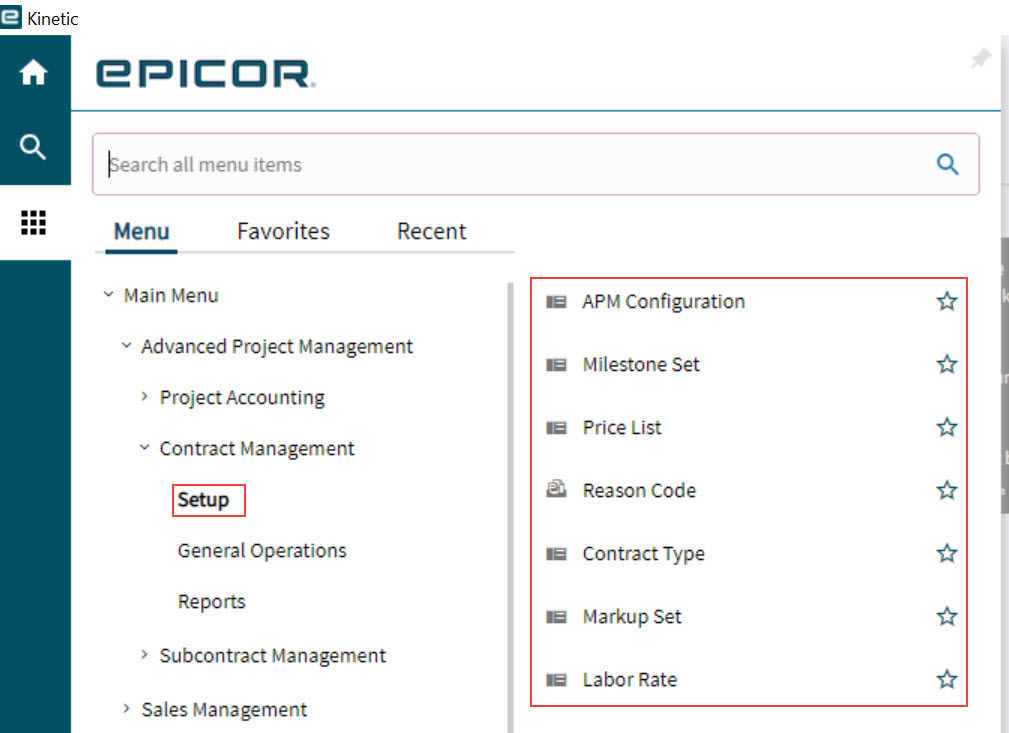
Refer to the Administration Section for an explanation and guide to the following setups for Contracts:
-
APM Configuration
-
Milestone Set
-
Price List
-
Reason Code
-
Contract Type
-
Markup Set
-
Labor Rate
The APM configuration elements for Contract Management are briefly summarized below.
APM Configuration
The defaults configured here are applied to any Contracts or Projects created in Advanced Project Management.
Read more about Advanced Project Management Configuration in the section APM Configuration.
Milestone Set
Contract line items that use the Progress billing type require a Milestone Set. Each Milestone Set contains one or more Milestones.
A milestone represents a task/activity or a certain stage within a project. Both parties will agree, in the contract, that when a milestone is reached (or even partially reached), this can be invoiced.
The full value (Discounted Value) of the contract line item is spread across the milestones within the milestone set, with each milestone valued by calculating its Claim Percent against the total value.
Below is an example of a milestone set, called MS1, which is made up of three milestones:
| MilestoneID | Description | Claim Percent | |
|---|---|---|---|
M100 |
Order Confirmation |
20.00 |
Valued at 20% of contract line item Discounted Value |
M200 |
Materials Purchased |
50.00 |
Valued at 50% of contract line Discounted Value |
M300 |
Delivery |
30.00 |
Valued at 30% of contract line Discounted Value |
Total Claim Percent: |
100.00 |
||
In APM, you don’t have to complete the whole milestone before claiming for it. You can create a contract claim for just a part of the milestone, using Cumulative Claim %, such that the customer agrees to be invoiced for just that portion of the milestone value (for example, 80%).
Creating Milestone Sets
The Administrator can create Milestone Sets specifically for a contract, or for a particular customer, or Milestones Sets that will be used in several contracts, and for many customers.
The Claim Percentage values of the individual Milestones should add up to a total of 100% for the full Milestone Set, so that all the contract claims and released contract retentions for the contract line item will add up to the full 100% of the Discounted Value for the line item.
Read more about Milestones Sets and how to set these up, in the section Milestone Sets.
Milestone Set for a Contract Type
When setting up a Contract Types, you can select a Milestone Set. This will set a default Milestone Set for contracts using that Contract Type, used for contract line items with Progress billing.
Price List
Price Lists can be used in APM Contracts to charge a customer for parts, materials, and services on contract line items with the Rates billing type. Price Lists are a standard Kinetic feature. For the Advanced Project Management module, price lists are easily accessible in Advanced Project Management > Contract Management > Setup.
If you are using Price Lists for contracts, the administrator should set up your Price Lists first.
Note that Price Lists are used for contract line items using the Rates billing type.
Reason Code
Reason Codes are standard in Kinetic. Reason Codes in Advanced Project Management are required for Contract Revisions, Contract Cancellations and Contract Claims for Rates Billing with a No Charge Amount.
See how to set them up: Reason Codes.
Contract Type
Contract Types make it quicker to add new contracts with a consistent structure.
The Administrator can set up Contract Types to define defaults that are used in contract billing: amongst others, Billing Type and Milestone Set. The contract type has a Description, which could summarise the contract type’s intended usage (for example, “Capital Contract”), or indicate the billing type and details for the Contract Type (for example, “Progress Billing 1”).
A new contract derives defaults from its specified Contract Type, where these have been defined in the Contract Type.
In addition, automations controlling related quotes and projects are defined at the Contract Type level.
See Contract Types.
Markup Set
Markups are used to set up increases (percentage or value) to a Miscellaneous Charge, Part Class, or Analysis Code, or anything that falls into none of these categories (Other) when a contract claim is created. A Markup Set is a collection of markups that can be added to a contract.
Read more about Markup Sets and how to set these up, in the section Markup Sets.
Note that Markup Sets are used for contract line items using the Rates billing type.
Labor Rate
The Administrator can set up Labor Rate templates for sets of Labor Rates that are used frequently in Contracts.
Labor Rate templates keep your Labor Rates consistent and provide a quick and easy way to set up Labor Rates for any contract that includes the Rates Billing Type.
Read more about Labor Rates and how to set these up, in the section Labor Rates.