Project Accounting Overview
Projects can range from simple to highly complex, with work distributed into phases. These phases are called WBS Phases (Work Breakdown Structure Phases). They can follow a flat structure, or they can form a hierarchy to indicate dependencies, or groups of related work. Each WBS Phase has a Start Date and End Date.
WBS Phases are further broken down by Cost Codes.
Each WBS Phase Cost Code is allocated a Budget. Actual Costs or Revenue that relate to these WBS Phase Cost Codes can then be compared against the respective Budgets, allowing for a detailed view of how well a WBS Phase Cost Code is performing. At the Project Level, all Costs, Revenues and Budgets are rolled up to provide an overview of Project performance.
Cost Codes are created for a Company at Configuration level. Cost Codes are assigned to each WBS Phase to allocate the Budget within the WBS Phase. Within WBS Phase Cost Codes, a Budget can be further divided into the Fiscal Periods that fall within a WBS Phase period, using the Generate Budget Spread process.
The alignment of Costs and Revenue against Budgets is achieved by running the processes Capture COS/WIP Activity and Recalculate Analysis. The Capture COS/WIP Activity process brings the costs of sales (COS) for the Project Jobs, Inventory, Receipts and Adjustment Transactions into the Financial Module. The Recalculate Analysis process brings in the transactions from the Financial Module that relate to the project (A/P invoices, A/R invoices, Labor and Part charges, and Costs charged to the Project).
In addition, Project Accruals can be created and posted periodically through the lifetime of a project, to give accurate and up-to-date indicators of Project performance and progress.
Budgets
Use the Budget Approval process to capture and then lock in a baseline budget. Budgets may only be approved by users with the appropriate permissions, and the approval date and approver’s username appear alongside the budget value.
A Project’s Budget is made up of the different WBS Phase Cost Code budgets; each WBS Phase has one or more Cost Codes, and each of these has a Budget, which is individually reviewed and approved. Alternatively, a budget can be allocated and approved at higher levels: WBS Phase or Project. You can also roll up child budgets to a higher level (phase or project).
You can allocate a budget to a WBS Phase Cost Code by entering the value, or you can import budgets for some or all of the WBS Phase Cost Codes. You can also export budgets from a Project.
If you add Operations and Materials to a WBS Phase’s Job, with Analysis Codes linked to the same Cost Code used in a WBS Phase Cost Code, then the calculated cost (based on labor rates and material costs) is calculated as the Planned Job Cost. The Planned Job Cost can then be used as a basis for the Budget value. Budgets are a critical measure for assessing the impact of Project Costs and Revenue through the lifetime of a Project. Note that you can view budget change history using snapshots of the project’s related contract. See Contract and Budget Change History.
Budget Spread
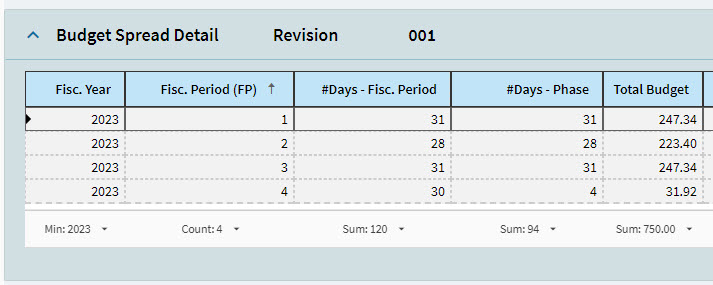
The Generate Budget Spread process splits budget amounts proportionately across the duration of the Project WBS Phase.
Budget Spread allows more control over how money is spent during the lifecycle of the phase. The budget spread can be flexible, as not all cost code budgets are likely to be spent at the same rate, even within the same Project phase. You can adjust the budget spread manually, amongst the different periods, ensuring that you keep the sum of the total budget consistent.
A Budget Spread can be created for WBS Phases > Cost Codes.
The Budget Available is calculated using the Total Budget (which is the Approved amount) less the Reserved Amount (which is calculated by applying the Reserved Percent against the Total Budget).
The Total Budget is divided proportionately between the Fiscal Periods that fall within the Start Date and Due Date of the Phase, based on the number of Phase days for the Fiscal Periods.
|
GL Controls in the Project
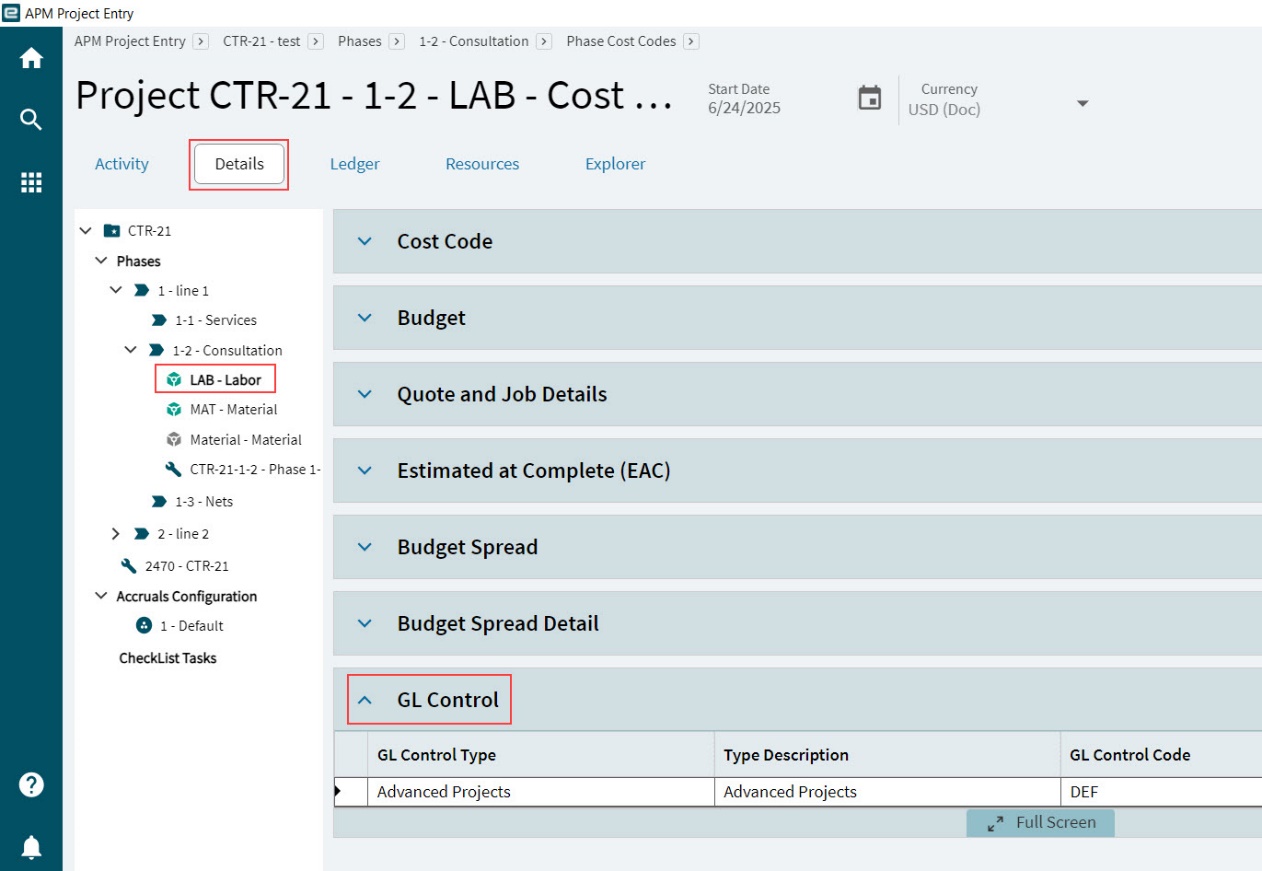
The GL Controls selected on the GL Control card on the Detail page define the GL accounts and journal codes used for posting transactions relating to the project.
An APM default GL Control Type is used for posting transactions related to project jobs.
GL Controls for projects can be established at project level for revenue and costs, and at project analysis and phase analysis levels for costs.
|
Revenue and Costs
Within APM Project, GL Controls for revenue and costs follow this hierarchy:
-
Phase Cost Code
-
Project Header
The GL Controls in APM Project will determine the posting of Project Accruals, these being Revenue and Cost Recognitions.
If a GL Control is not specified in the Phase Cost Code, the GL Control of the Project Header will be used when Revenue or Cost Recognitions are posted.
If no GL Controls are specified within the Project, the GL Controls within the contract will be used.
Otherwise, the system will default to the standard AR GL Control when posting Revenue or Cost Recognitions.
Project Accrual Groups
Project Accruals can use different calculation methods. Within a single project, there may be more than one suitable calculation method, depending on the type of work carried out in the different phases (for example, Installation Services, Spare Parts, Training Services, Core Manufacturing).
Within a project, you can define exactly how the accruals are calculated for each of several Accrual Groups. Link each project phase to an appropriate Accrual Group, so that collectively the accruals are calculated using different groups of rules, thus generating a more accurate and realistic Accrual Set.
Working with Project Accruals
Project Accruals provide financial recognition of revenue and expenses based on various valuation methods. These valuation methods include:
-
Amount Billed
-
Progress percentage
-
Cash Received
Project Accruals show the true profitability of a Project, based on current performance values and expected completion dates. When Project Accruals are processed, transactions are generated to the General Ledger. If an Accrual uses a Project Accrual Group with the Manual Method of Cost Recognition, limited manual adjustments can be made to the accrual calculations, prior to Posting. If necessary, manual journal adjustments can be made to the Project. See APM Project Journal Entry.
Processing Project Accruals
Before generating a project accrual, review whether a project accrual (both cost and revenue) is required. The Ledger page in APM Project Entry (see Ledger Page) displays the transactions already captured for the project.
See how to Generate and Process a Project Accrual set (below).
Project Accrual Sets
Follow these steps when generating a Project Accrual:
-
Review the Project Accrual Group Details for the Accrual Group used in the separate WBS Phases, in APM Project Entry. See Adding Accrual Groups.
-
Generate the Project Accrual in APM Project Accruals Workbench (see Generating Accruals).
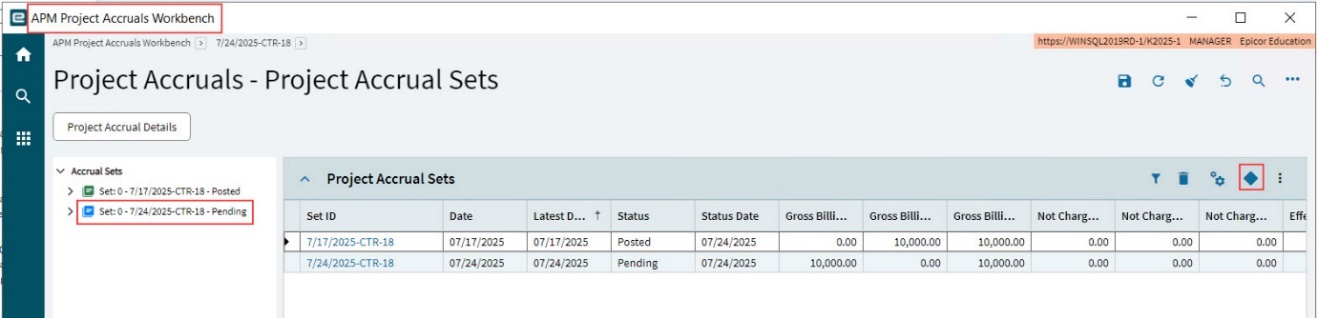
The Project Accrual Set is generated, using the selected formulas, settings, and the As Of Date. The new Project Accrual Set is added to the list of Project Accrual Sets for the project, in APM Project Accruals Workbench.
-
Expand the Accrual Set on the Navigation Tree then select and review the child phases from the Navigation Tree. The Accrual Details card shows the details (see Accrual Details).
-
After reviewing the Accruals at the different levels, you can submit the Accrual Set for processing (see Processing Accruals).
Accrual Details
The values in each level within an Accrual Set  are a roll-up of the levels below it. Navigate
through the separate levels using the Navigation Tree. The highest level in the set is the Accrual
Group
are a roll-up of the levels below it. Navigate
through the separate levels using the Navigation Tree. The highest level in the set is the Accrual
Group  of which there may be more than one. If the accrual configuration has Include Advanced Payments in Accruals Processing selected, then there will be an Advanced Payments node under cost code nodes where an advanced payment has been processed against a related job material.
|
Revenue
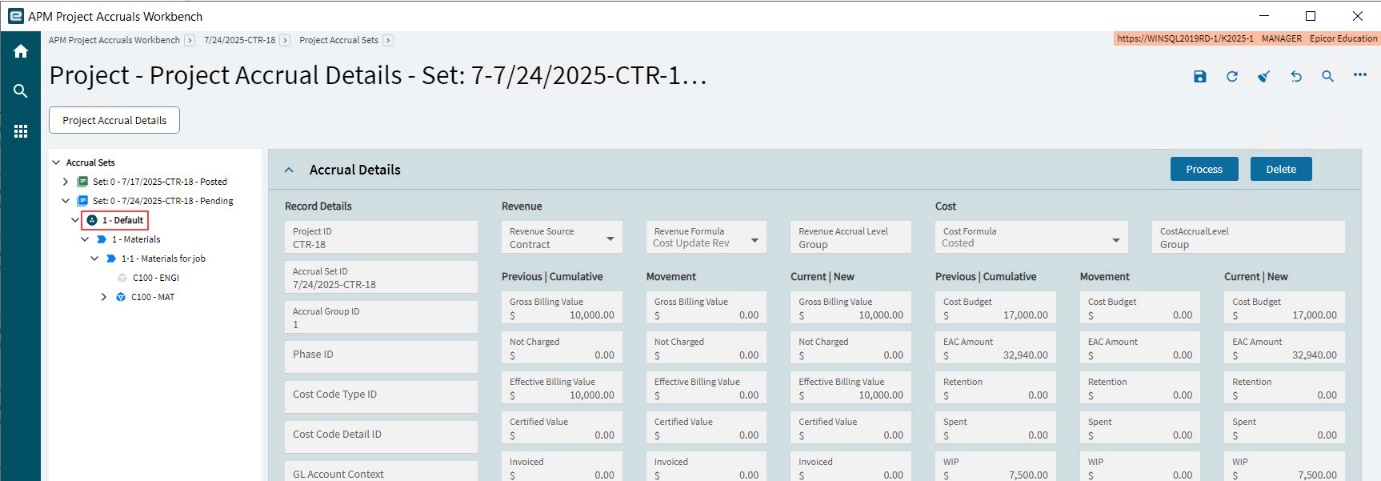
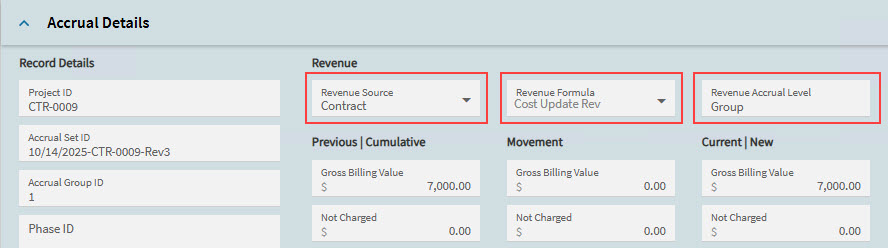
The Revenue Source, Revenue Formula and Revenue Accrual Level applied at this level are displayed above the Revenue value columns. Note that these are selected in the WBS Phase Detail, before the Accrual Set is generated. See Selecting the Accrual Configuration. This will be the same for all levels under an Accrual Group node on the Navigation Tree. For a definition of the settings, see Project Accrual Defaults.
|
Each value is shown in the Previous/Cumulative accrual set, as well as in the Current/New accrual set. The Movement between previous and current is listed as well:
|
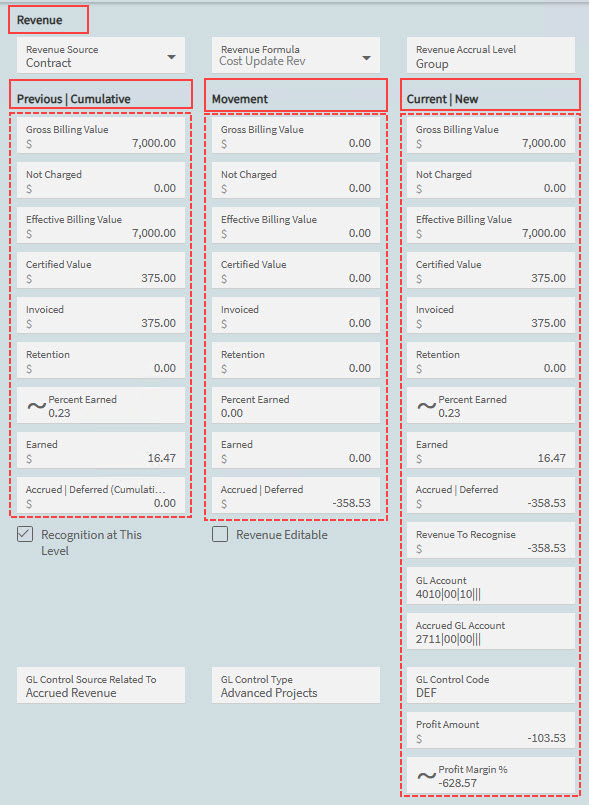
The Revenue is calculated according to these methods (Revenue Formula):
- Invoiced
-
The contract invoiced value is used to determine the project earned value. No accruals are processed.
- Manual
-
The percentage or amount is entered for the project earned.
- Cost Update Rev
-
The cost percentage figure is used to populate the project percentage and amount earned values.
The Revenue Source will be either Sales Order or Contract. See the APM Configuration section Project Accrual Defaults.
Profit Amount and Profit Margin
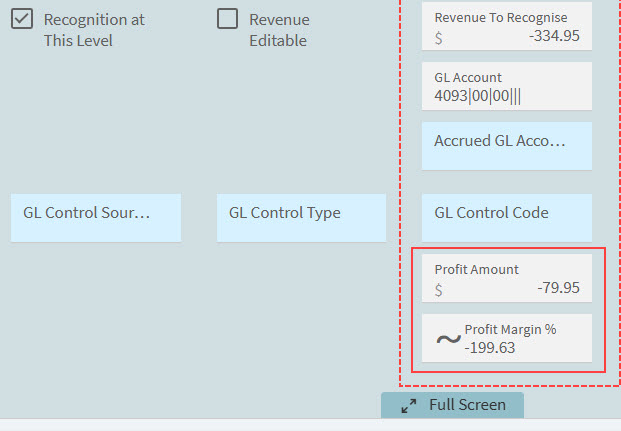
These fields are displayed at the bottom of the Current | New column under Revenue, on the level that has Recognition at This Level selected.
- Profit Amount
-
Displays the absolute profit margin, representing the difference between earned revenue and costs incurred.
- Profit Margin %
-
Displays the profit margin as a percentage, showing the proportion of earned value relative to costs.
|
Cost
The Cost Formula and Cost Accrual Level applied at this level are displayed above the Cost value columns. Note that these are selected in the WBS Phase Detail, before the Accrual Set is generated. See Selecting the Accrual Configuration. This will be the same for all levels under an Accrual Group node on the Navigation Tree. For a definition of the settings, see Project Accrual Defaults.
|
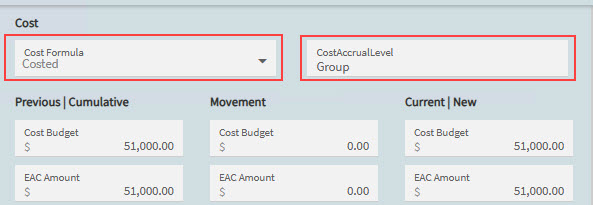
Each value is shown in the Previous/Cumulative accrual set, as well as in the Current/New accrual set. The Movement between previous and current is listed as well:
|
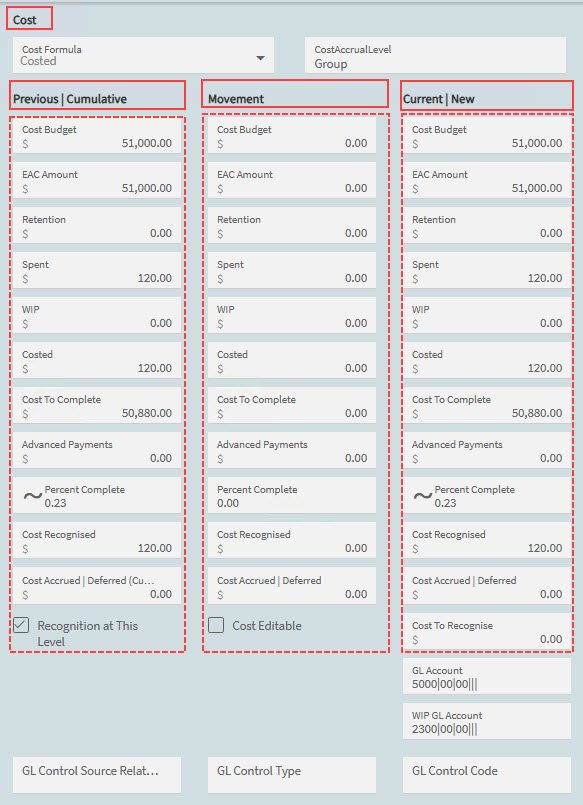
The Cost is calculated according to these methods:
- Manual
-
The percentage or amount is entered for the project cost balance.
- Costed
-
The amount costed (including WIP) is used to determine the project costed value. Accruals may be processed to expense WIP values.
- Rev Update Cost
-
The revenue percentage figure is used to populate the cost percentage figure.
See the APM Configuration section Project Accrual Defaults.