Reason Code
|
In Advanced Project Management, you can navigate to Reason Code Set from the Contract Management and Subcontract Management modules:
|
Reason Codes are standard in Kinetic.
| If you are creating or editing Reason Codes, refer to the standard Kinetic help article Creating a Reason Code. |
In APM, Reason Codes are required for Contract Revisions, Contract Cancellations and Contract Claims for Rates Billing with a No Charge Amount.
-
When used for Contract Revision, the Reason Type is Revision.
-
When used for Contract Cancellation, the Reason Type is Cancel.
-
When used in Contract Claim Entry for Rates Billing with a No Charge Amount, the Reason Type is No Charge.
Default Reason Codes are selected in the Configuration screen for the Automatic Contract Price Change Reason Code and the Automatic Contract Bill Plan Generation Reason Code. See Default Reason Code in the section APM Configuration Entry.
- Menu Path in APM
-
Advanced Project Management > Contract Management > Setup > Reason Code
- Standard Kinetic Menu Path
-
Sales Management > Customer Relationship Management > Setup > Reason Code
|
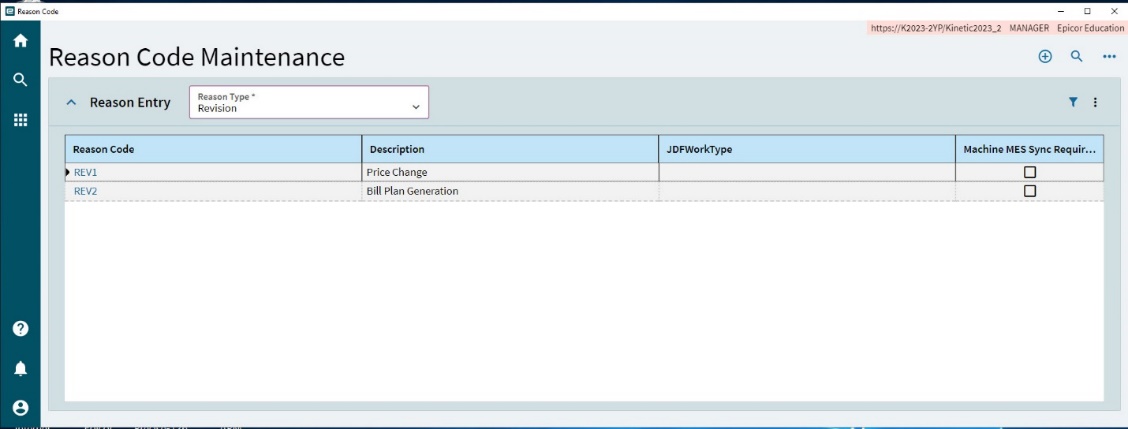
When you revise a contract, any Reason Codes created with Reason Type Revision (see above) are included in the selection list, as shown below.
|
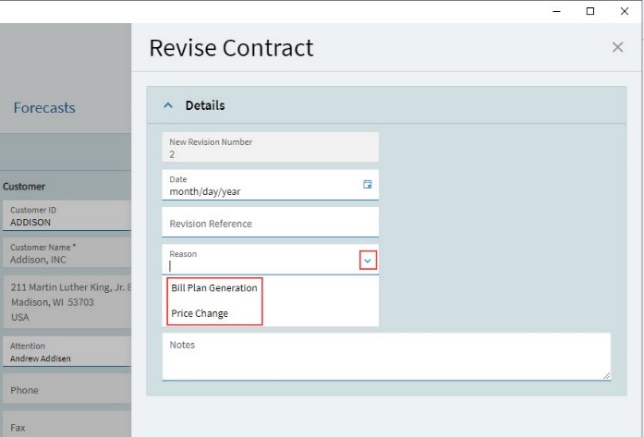
If you cancel a Contract, a list of Reason Codes with Reason Type Cancel is displayed in the drop down list.
In Contract Claim Entry if you want to include a No Charge Amt on a Line Item, a list of Reason Codes with Reason Type No Charge is displayed in the drop-down list.