Contract Type
Contract Types make it quicker to add new contracts with a consistent structure.
The Administrator can set up Contract Types to define defaults that are used in contract billing: amongst others, Billing Type and Milestone Set. The contract type has a Description, which could summarise the contract type’s intended usage (for example, “Capital Contract”), or indicate the billing type and details for the Contract Type (for example, “Progress Billing 1”).
A new contract derives defaults from its specified Contract Type, where these have been defined in the Contract Type.
In addition, automations controlling related quotes and projects are defined at the Contract Type level.
There are three fields that can optionally be defined for a Contract Type, as well as a Code and Description:
-
Milestone Set
-
Billing Type
-
Advanced GL Control Settings
Defaults in the Contract Type are added as defaults on the Contract Entry > Defaults card for new Contracts using this Contract Type.
- Menu Path
-
Advanced Project Management > Contract Management > Setup > Contract Type
|
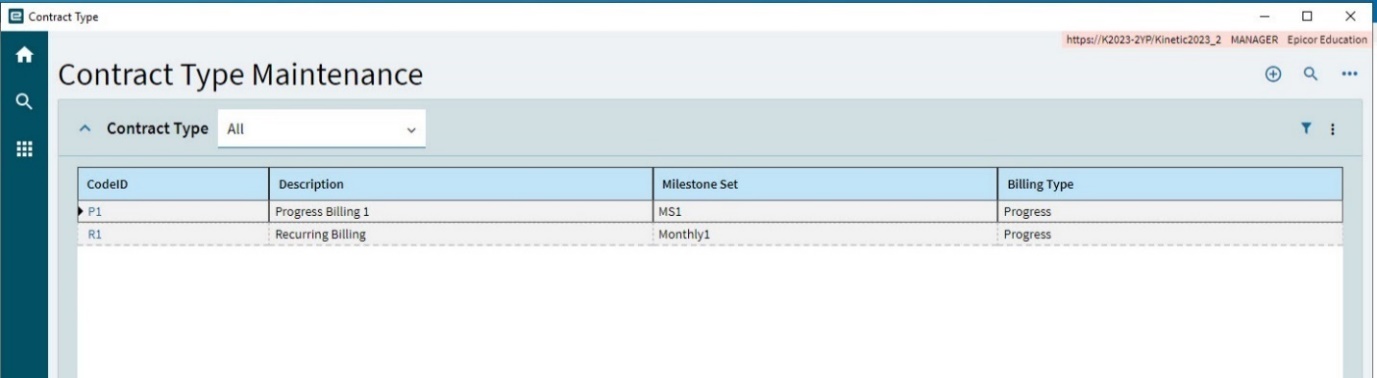
When you create a new Contract, you can select a Contract Type to auto-populate the relevant data in the New Contract slide-out panel. See Adding a New Contract.
Adding a Contract Type
-
Navigate to Contract Type Maintenance.
-
Select New
 on the Standard toolbar.
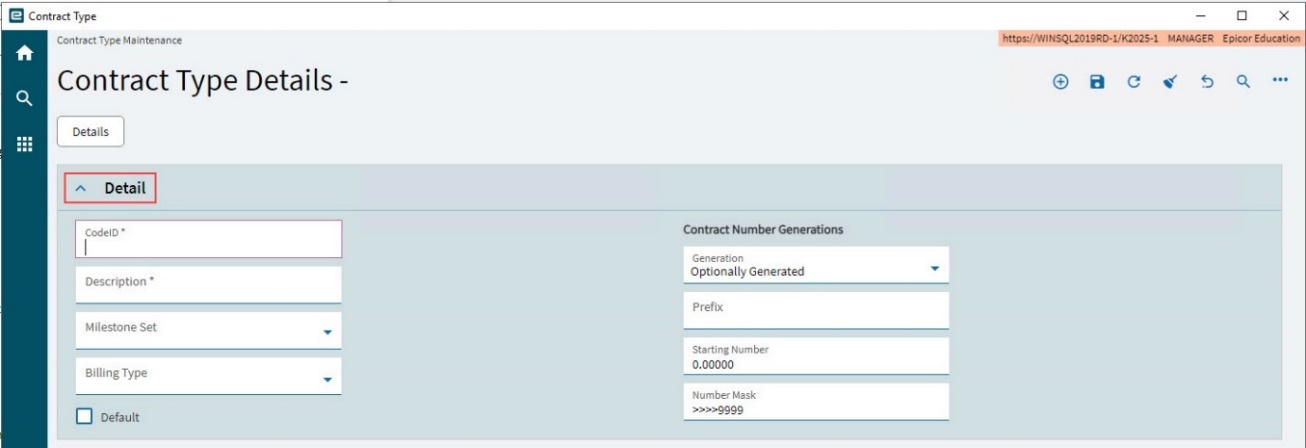
The Details page opens, with the Detail card expanded.
-
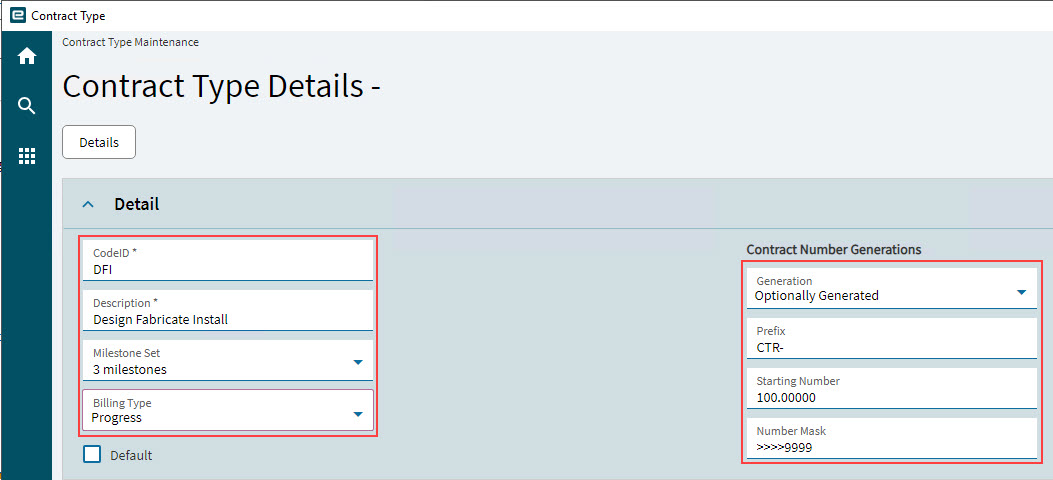
Enter a CodeID for the new Contract Type.
-
Enter a Description.
-
Select a Milestone Set from the drop-down list.
-
Select a Billing Type from the drop-down list.
-
Select Default if this is the default contract type for new contracts.
-
Set the Contract Number Generations.
-
Select a Generation from the drop-down list.
-
Enter a Prefix.
-
Enter a Starting Number.
-
Enter a Number Mask.
-
-
Select Save
 on the Standard toolbar.
|
Advanced GL Control Settings
The Advanced GL Control Settings are derived from the Configuration. See APM Configuration Entry. Currently these settings are read-only. Contracts inherit their default Advanced GL Control Settings from the Contract Type.
Automations - For Active Contract Revision
The settings here apply to active revisions contracts of this Contract Type.
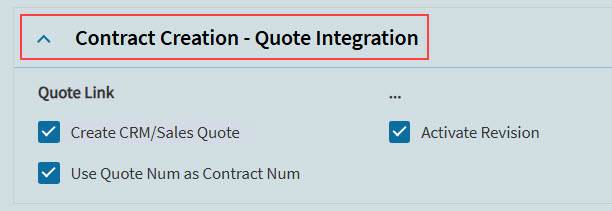
Contract Creation - Quote Integration
These settings relate to a linked CRM quote or contracts created using this Contract Type.
To create a linked CRM Quote, select the Create Linked CRM Quote check box. Select a Sync Mode (Manual or Automatic-Full).
-
If Create CRM/Sales Quote is selected, then Create Linked CRM Quote is selected in the New Contract slide-out panel, for this Contract Type. Sync Mode is set to Automatic-Full.
With this setting selected, the new contract will have a linked quote.
-
If Use Quote Num as Contract Num is selected, the new contract’s contract number is the same as the quote number.
-
If Activate Revision is selected, the new contract is automatically activated. A memo is saved to the new contract.
|
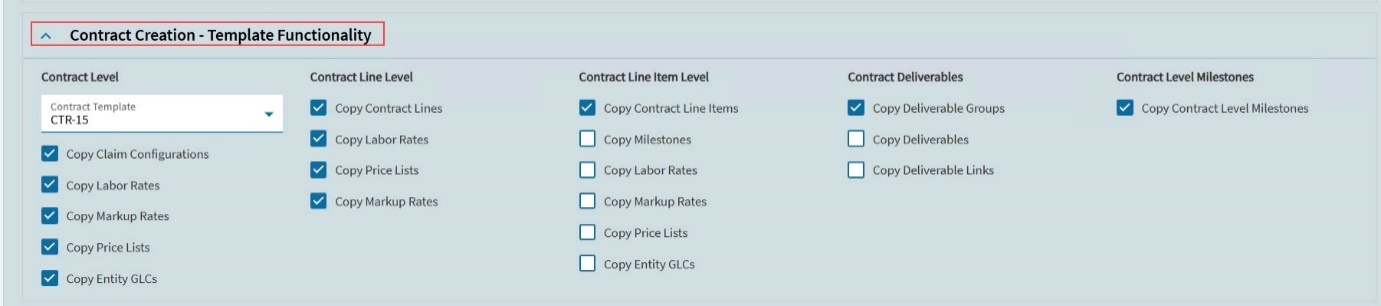
Contract Creation - Template Functionality
Use this section to select a template always used for this Contract Type. Contracts using this contract type will be based off the selected Contract Template.
After selecting a Contract Template you can select which details of the contract template are copied to a new contract, by selecting from the available check boxes. Note that some of the check boxes are only enabled when another check box is selected (for example, select Copy Contract Lines to enable Copy Contract Line Items).
-
Select a Contract Template from the drop-down list. Contracts that are designated as Templates are available for selection.
-
Choose contract level options to copy to a new contract by selecting check boxes from the Contract Level section:
-
Copy Claim Configurations
-
Copy Labor Rates
-
Copy Markup Rates
-
Copy Price Lists
-
Copy Entity GLCs
-
-
Choose contract line level options to copy to a new contract by selecting check boxes from the Contract Line Level section.
-
Copy Contract Lines
-
Copy Labor Rates
-
Copy Price Lists
-
Copy Markup Rates
-
-
Choose contract line item level options to copy to a new contract by selecting check boxes from the Contract Line Item Level section.
-
Copy Contract Line Items
-
Copy Milestones
-
Copy Labor Rates
-
Copy Markup Rates
-
Copy Price Lists
-
Copy Entity GLCs
-
-
Choose contract deliverables options to copy to a new contract by selecting check boxes from the Contract Deliverables section.
-
Copy Deliverable Groups
-
Copy Deliverables
-
Copy Deliverable Links
-
-
Choose contract level milestones options to copy to a new contract by selecting the check box from the Contract Level Milestones section.
-
Copy Contract Level Milestones
-
Only those features that are selected will copy into a new Contract (for example, Claim Configurations, and Contract Lines if these are the only selections).
|
Create Project from Contract
This section contains a set of defaults for selections when creating a project from a contract of this Contract Type. You can select different settings from the defaults when Creating a Project from Contract.
|
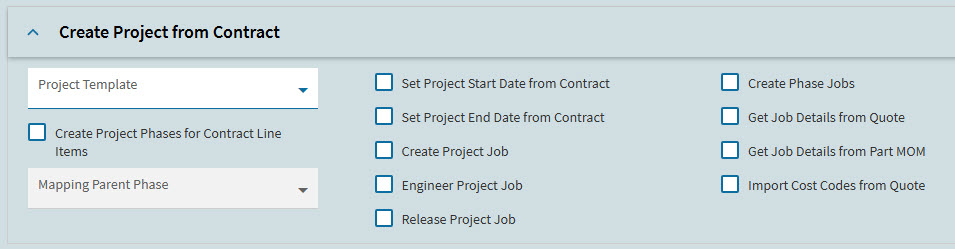
| Setting | Details |
|---|---|
<column 1> |
|
Project Template |
Select a project template from the drop-down list. When creating a project from a contract of this contract type, this is the project template used. |
Create Project Phases for Contract Line Items |
If selected, project phases are created, based on the project template’s phases. |
Mapping Parent Phase |
This is used for mapping Sales Order lines or Quote lines under the specified phase within the project template. |
<column 2> |
|
Set Project Start Date from Contract |
If selected, the project start date uses the contract start date. |
Set Project End Date from Contract |
If selected, the project end date uses the contract end date. |
Create Project Job |
If selected, the project job is created automatically. |
Engineer Project Job |
If selected, the project job is set to Engineered. |
Release Project Job |
If selected, the project job is set to Released. |
<column 3> |
|
Create Phase Jobs |
If selected, a phase is created for each phase of the project template. |
Create Job Details from Quote |
If selected, job details are created for each project phase. |
Get Job Details from Part MOM |
If selected, job details are fetched from the part’s method of manufacturing. |
Import Cost Codes from Quote |
If selected, cost codes are imported from related quotes. |
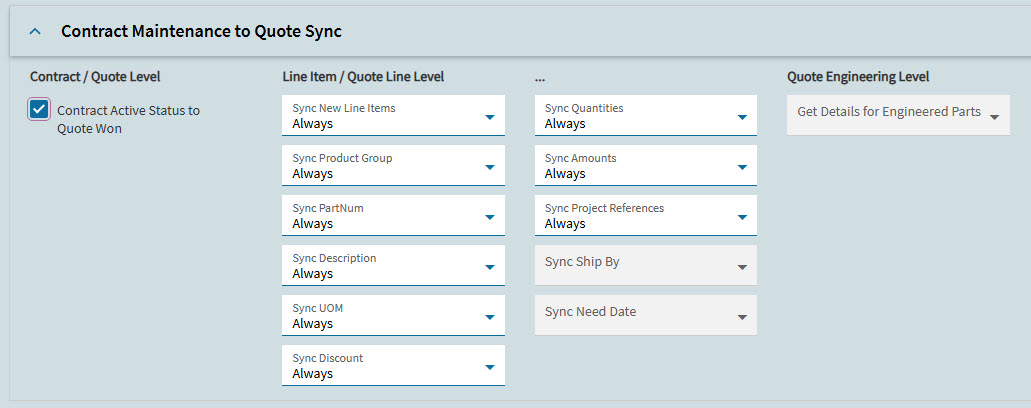
Contract Maintenance to Quote Sync
If APM Project Configuration is configured for CRM Quote Mapping, with Sync Mode selected as Automatic-Full, then updates to contract lines are synched to their corresponding quote lines.
The Contract Maintenance to Quote Sync section has options for controlling what is synced for contracts of this Contract Type, and when this should occur.
|
| Setting | Details |
|---|---|
Contract / Quote Level |
|
Contract Active Status to Quote Won |
Change quote status to Won when the contract status is updated to Active. |
Line Item / Quote Line Level |
|
Line Item / Quote Line Level Select conditions for updates to each of the following fields/group of fields:
|
For each of the drop-downs lists, update the corresponding field on the quote to the new value on the contract, if there are changes to the contract during the selected conditions. Selected conditions are:
|
Quote Engineering Level |
|
Get Details for Engineered Parts |
This option is currently disabled. |
Contract Maintenance to Project Sync
This section has settings which determine when various elements of the contract are synced with the project. For each of these elements (for example, Contract Level description, Line Level new lines) you can select when, if ever, they are synced with the related project.
For each listed element, these are the options to select:
- Never
-
Never sync to the project
- Before Contract Tendered
-
Sync to the project until the contract is tendered (Contract Status is Tendered)
- Before Contract Awarded
-
Sync to the project until the contract is awarded (Contract Status is Awarded)
- Before Contract Active
-
Sync to the project until the contract is active (Contract Status is Active)
- Always
-
Sync to the project always (regardless of the contract Status)
-
Set the Contract Level selections.
-
Sync Description
-
Sync Start Date
-
Sync End Date
-
-
Set the Line Level selections.
-
Sync New Lines
-
Sync Descriptions
-
-
Set the Line Item Level selections.
-
Sync New Line Items
-
Sync Descriptions
-
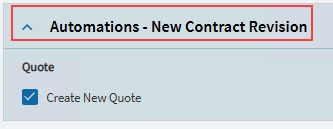
Automations - New Contract Revision
The check box Create New Quote is selected or cleared, affecting its default value for a new contract created from this contract type.
If Create New Quote is selected for a new contract, a new linked CRM Quote is automatically created for that contract. Sync Mode defaults to Automatic-Full.
|
Advanced - Automatic Rates Billing Claim Default Configurations
The logic and requirements for rates billing may vary between different contract types, or for different customers, or across different companies.
For example, in some instances it is required to charge against a named price list, while in other instances you may need to apply a markup percentage on top of the price.
To allow for these differences, you can set up defaults within contract types, and then adjust on a contract claim as required. See Updating Billing Details and Updating Time Billing Details for Labor Transactions and Time Transactions, respectively, in Contract Claim Entry.
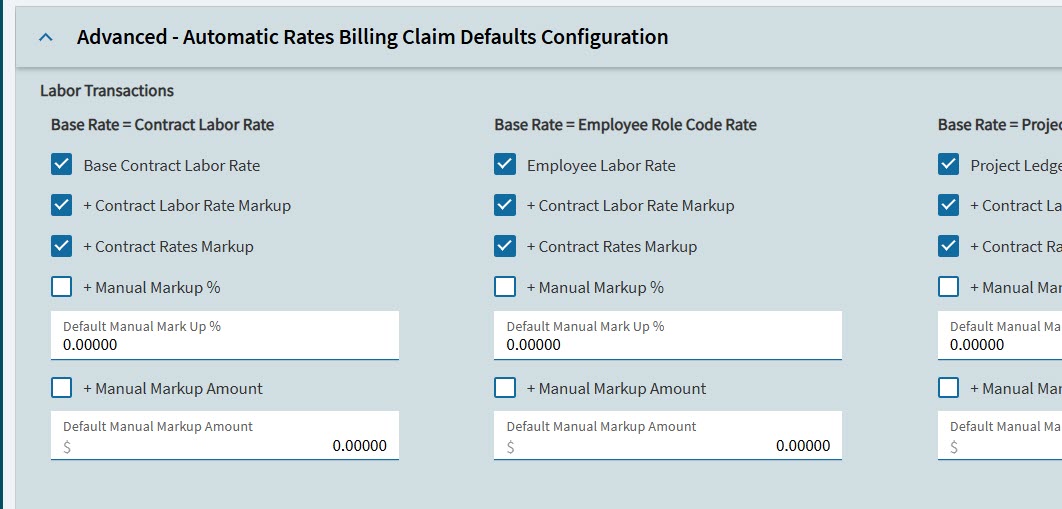
There are two sets of settings.
-
Labor Transactions
-
Material Transactions
Labor Transactions settings define the defaults to be used for labor-related rates billing (operations).
| Setting | Details |
|---|---|
Base Rate = Contract Labor Rate |
|
Base Contract Labor Rate |
Controls if the system should automatically set the Base Rate Source as ‘Contract Labor Rate’ if one is found during the creation of new Contract Claim Labor Rate records. |
+ Contract Labor Rate Markup |
Controls if the system should, when the Base Rate is Contract Labor Rate, automatically set the Markup Rate Source as ‘Contract Labor Rate’ if one is found during the creation of new Contract Claim Labor Rate records. |
+ Contract Rates Markup |
Controls if the system should, when the Base Rate is ‘Contract Labor Rate’ and the Markup Rate Source has not been set, automatically set the Markup Rate Source as ‘Contract Labor Rate’ if one is found during the creation of new Contract Claim Labor Rate records. |
+ Manual Markup % |
Controls if the system should, when the Base Rate is ‘Contract Labor Rate’ and the Markup Rate Source has not been set, automatically set the Markup Rate Source as ‘Manual Markup %’ during the creation of new Contract Claim Labor Rate records. |
Default Manual Markup % |
Sets the default Markup % to be populated for new Base Rate Source = ‘Contract Labor Rate’ Contract Claim Labor Rate records. |
+ Manual Markup Amount |
Controls if the system should, when the Base Rate is Contract Labor Rate and the ‘Markup Rate Source’ has not been set, automatically set the Markup Rate Source as ‘Manual Markup Amount’ during the creation of new Contract Claim Labor Rate records. |
Default Manual Markup Amount |
Sets the default Markup Amount to be populated for new Base Rate Source = ‘Contract Labor Rate’ Contract Claim Labor Rate records. |
Base Rate = Employee Role Code Rate |
|
Employee Labor Rate |
Controls if the system should automatically set the Base Rate Source as ‘Employee Role Code Rate’ if one is found during the creation of new Contract Claim Labor Rate records and a Base Rate Source has not already been set. |
+ Contract Labor Rate Markup |
Controls if the system should, when the Base Rate is 'Employee Role Code Rate', automatically set the Markup Rate Source as ‘Contract Labor Rate’ if one is found during the creation of new Contract Claim Labor Rate records. |
+ Contract Rates Markup |
Controls if the system should, when the Base Rate is ‘Employee Role Code Rate’ and the Markup Rate Source has not been set, automatically set the Markup Rate Source as ‘Contract Labor Rate’ if one is found during the creation of new Contract Claim Labor Rate records. |
+ Manual Markup % |
Controls if the system should, when the Base Rate is ‘Employee Role Code Rate’ and the Markup Rate Source has not been set, automatically set the Markup Rate Source as ‘Manual Markup %’ during the creation of new Contract Claim Labor Rate records. |
Default Manual Markup % |
Sets the default Markup % to be populated for new Base Rate Source = ‘Employee Role Code Rate’ Contract Claim Labor Rate records. |
+ Manual Markup Amount |
Controls if the system should, when the Base Rate is 'Employee Role Code Rate' and the ‘Markup Rate Source’ has not been set, automatically set the Markup Rate Source as ‘Manual Markup Amount’ during the creation of new Contract Claim Labor Rate records. |
Default Manual Markup Amount |
Sets the default Markup Amount to be populated for new Base Rate Source = ‘Employee Role Code Rate’ Contract Claim Labor Rate records. |
Base Rate = Project Ledger Cost Rate |
|
Project Ledger Cost Rate |
Controls if the system should automatically set the Base Rate Source as ‘Project Ledger Cost Rate’ if one is found during the creation of new Contract Claim Labor Rate records and a Base Rate Source has not already been set. |
+ Contract Labor Rate Markup |
Controls if the system should, when the Base Rate is 'Project Ledger Cost Rate', automatically set the Markup Rate Source as ‘Contract Labor Rate’ if one is found during the creation of new Contract Claim Labor Rate records. |
+ Contract Rates Markup |
Controls if the system should, when the Base Rate is ‘Project Ledger Cost Rate’ and the Markup Rate Source has not been set, automatically set the Markup Rate Source as ‘Contract Labor Rate’ if one is found during the creation of new Contract Claim Labor Rate records. |
+ Manual Markup % |
Controls if the system should, when the Base Rate is ‘Project Ledger Cost Rate’ and the Markup Rate Source has not been set, automatically set the Markup Rate Source as ‘Manual Markup %’ during the creation of new Contract Claim Labor Rate records. |
Default Manual Markup % |
Sets the default Markup % to be populated for new Base Rate Source = ‘Project Ledger Cost Rate’ Contract Claim Labor Rate records. |
+ Manual Markup Amount |
Controls if the system should, when the Base Rate is 'Project Ledger Cost Rate' and the ‘Markup Rate Source’ has not been set, automatically set the Markup Rate Source as ‘Manual Markup Amount’ during the creation of new Contract Claim Labor Rate records. |
Default Manual Markup Amount |
Sets the default Markup % to be populated for new Base Rate Source = ‘Project Ledger Cost Rate’ Contract Claim Labor Rate records. |
Base Rate = Manual |
|
Manual Cost Rate |
Controls if the system should automatically set the Base Rate Source as ‘Manual Cost Rate’, if a Base Rate Source has not already been set. This option is always be set to checked/true and read-only. |
Default Manual Rate |
Can be used to set a default manual rate for new Contract Claim Labor Rate records. |
+ Contract Labor Rate Markup |
Controls if the system should, when the Base Rate is 'Manual Cost Rate', automatically set the Markup Rate Source as ‘Contract Labor Rate’ if one is found during the creation of new Contract Claim Labor Rate records. |
+ Contract Rates Markup |
Controls if the system should, when the Base Rate is ‘Manual Cost Rate’ and the Markup Rate Source has not been set, automatically set the Markup Rate Source as ‘Contract Labor Rate’ if one is found during the creation of new Contract Claim Labor Rate records. |
+ Manual Markup % |
Controls if the system should, when the Base Rate is ‘Manual Cost Rate’ and the Markup Rate Source has not been set, automatically set the Markup Rate Source as ‘Manual Markup %’ during the creation of new Contract Claim Labor Rate records. |
Default Manual Markup % |
Sets the default Markup % to be populated for new Base Rate Source = ‘Manual Cost Rate’ Contract Claim Labor Rate records. |
+ Manual Markup Amount |
Controls if the system should, when the Base Rate is 'Manual Cost Rate' and the ‘Markup Rate Source’ has not been set, automatically set the Markup Rate Source as ‘Manual Markup Amount’ during the creation of new Contract Claim Labor Rate records. |
Default Manual Markup Amount |
Sets the default Markup % to be populated for new Base Rate Source = ‘Manual Cost Rate’ Contract Claim Labor Rate records. |
Material Transactions settings define the defaults to be used for material-related rates billing (materials).
| Setting | Details |
|---|---|
Base Rate = Contract Price List |
|
Base Price List Rate |
Controls if the system should automatically set the Base Rate Source as ‘Contract Price List’ if one is found during the creation of new Contract Claim Part Rate records. |
+ Contract Markup Set |
Controls if the system should, when the Base Rate is 'Contract Price List', automatically set the Markup Rate Source as ‘Contract Markup Set’ if one is found during the creation of new Contract Claim Part Rate records. |
+ Manual Markup % |
Controls if the system should, when the Base Rate is ‘Contract Price List’ and the Markup Rate Source has not been set, automatically set the Markup Rate Source as ‘Manual Markup %’ during the creation of new Contract Claim Part Rate records. |
Default Manual Markup % |
Sets the default Markup % to be populated for new Base Rate Source = ‘Contract Price List’ Contract Claim Part Rate records. |
+ Manual Markup Amount |
Controls if the system should, when the Base Rate is 'Contract Price List' and the ‘Markup Rate Source’ has not been set, automatically set the Markup Rate Source as ‘Manual Markup Amount’ during the creation of new Contract Claim Part Rate records. |
Default Manual Markup Amount |
Sets the default Markup % to be populated for new Base Rate Source = ‘Contract Price List’ Contract Claim Part Rate records. |
Base Rate = Project Ledger Cost Rate |
|
Project Ledger Cost Rate |
Controls if the system should automatically set the Base Rate Source as ‘Project Ledger Cost Rate’ if one is found during the creation of new Contract Claim Part Rate records. |
+ Contract Markup Set |
Controls if the system should, when the Base Rate is 'Project Ledger Cost Rate, automatically set the Markup Rate Source as ‘Contract Markup Set’ if one is found during the creation of new Contract Claim Part Rate records. |
+ Manual Markup % |
Controls if the system should, when the Base Rate is ‘Project Ledger Cost Rate’ and the Markup Rate Source has not been set, automatically set the Markup Rate Source as ‘Manual Markup %’ during the creation of new Contract Claim Part Rate records. |
Default Manual Markup % |
Sets the default Markup % to be populated for new Base Rate Source = ‘Project Ledger Cost Rate’ Contract Claim Part Rate records. |
+ Manual Markup Amount |
Controls if the system should, when the Base Rate is 'Project Ledger Cost Rate' and the ‘Markup Rate Source’ has not been set, automatically set the Markup Rate Source as ‘Manual Markup Amount’ during the creation of new Contract Claim Part Rate records. |
Default Manual Markup Amount |
Sets the default Markup % to be populated for new Base Rate Source = ‘Project Ledger Cost Rate’ Contract Claim Part Rate records. |
Base Rate = Manual |
|
Manual Cost Rate |
Controls if the system should automatically set the Base Rate Source as ‘Project Ledger Cost Rate’ if one is found during the creation of new Contract Claim Part Rate records. |
Default Manual Markup Amount |
Can be used to set a default manual rate for new Contract Claim Part Rate records. |
+ Contract Markup Set |
Controls if the system should, when the Base Rate is ‘Project Ledger Cost Rate’, automatically set the Markup Rate Source as ‘Contract Markup Set’ if one is found during the creation of new Contract Claim Part Rate records. |
+ Manual Markup % |
Controls if the system should, when the Base Rate is ‘Project Ledger Cost Rate’ and the Markup Rate Source has not been set, automatically set the Markup Rate Source as ‘Manual Markup %’ during the creation of new Contract Claim Part Rate records. |
Default Manual Markup % |
Sets the default Markup % to be populated for new Base Rate Source = ‘Project Ledger Cost Rate’ Contract Claim Part Rate records. |
+ Manual Markup Amount |
Controls if the system should, when the Base Rate is 'Project Ledger Cost Rate' and the ‘Markup Rate Source’ has not been set, automatically set the Markup Rate Source as ‘Manual Markup Amount’ during the creation of new Contract Claim Part Rate records. |
Default Manual Markup Amount |
Sets the default Markup % to be populated for new Base Rate Source = ‘Project Ledger Cost Rate’ Contract Claim Part Rate records. |