Milestone Set
|
You can navigate to Milestone Set from the Contract Management and Subcontract Management modules:
|
In Advanced Project Management, you can manage progress and billing with Milestones.
A milestone is typically a noteworthy task, activity, or stage within a project that can be billed on partial or full completion.
APM provides for the creation of sets of milestones that can be used multiple times, across multiple projects.
Contract and subcontract line items that use the Progress billing type require a Milestone Set. Each Milestone Set contains one or more Milestones.
A Milestone Set can be created and used specifically for a single customer’s contracts, or it can be selected in a Contract Type, where it is the default Milestone Set for any contracts using that Contract Type.
APM allows for claiming against:
-
the progress of a single milestone
-
across multiple milestones within a single contract line item
-
across multiple line items within a single contract.
| In APM progress billing, it is possible to bill against one or more milestones in full or in part, within a single Contract Claim. |
About Milestone Set
A milestone represents a task/activity or a certain stage within a project. Both parties will agree, in the contract, that when a milestone is reached (or even partially reached), this can be invoiced.
The full value (Discounted Value) of the contract line item is spread across the milestones within the milestone set, with each milestone valued by calculating its Claim Percent against the total value.
Below is an example of a milestone set, called MS1, which is made up of three milestones:
| MilestoneID | Description | Claim Percent | |
|---|---|---|---|
M100 |
Order Confirmation |
20.00 |
Valued at 20% of contract line item Discounted Value |
M200 |
Materials Purchased |
50.00 |
Valued at 50% of contract line Discounted Value |
M300 |
Delivery |
30.00 |
Valued at 30% of contract line Discounted Value |
Total Claim Percent: |
100.00 |
||
In APM, you don’t have to complete the whole milestone before claiming for it. You can create a contract claim for just a part of the milestone, using Cumulative Claim %, such that the customer agrees to be invoiced for just that portion of the milestone value (for example, 80%).
Creating Milestone Sets
The Administrator can create Milestone Sets specifically for a contract/subcontract, or for a particular customer, or Milestones Sets that will be used in several contracts/subcontracts, and for many customers.
The Claim Percentage values of the individual Milestones should add up to a total of 100% for the full Milestone Set, so that all the contract claims and released contract retentions for the contract line item will add up to the full 100% of the Discounted Value for the line item.
Milestone Set for a Contract Type
When setting up a Contract Type, you can select a Milestone Set. This will set a default Milestone Set for contracts using that Contract Type, used for contract line items with Progress billing.
Milestone Maintenance
There are two types of Milestone Sets that you can set up:
- Fixed
-
This Milestone Set uses one or more defined Milestones over the duration of the contract, each with its own Claim Percentage.
- Recurring
-
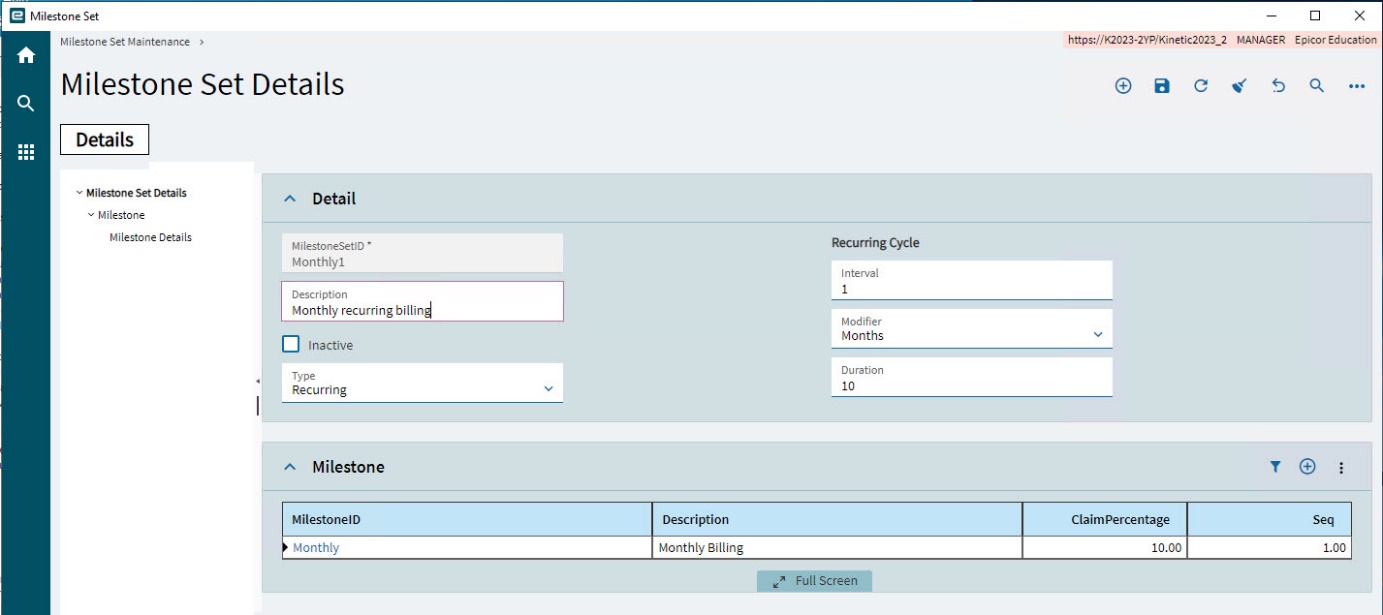
This Milestone Set has a single Milestone with a recurring cycle. For example, 10 percent of the claim to be claimed once a month over ten months.
Menu Path: Advanced Project Management > Contract Management > Setup > Milestone Set
Adding a Fixed Milestone Set
Select Fixed for a Milestone Set that uses one or more defined Milestones over the duration of the contract, each with its own Claim Percentage.
-
Select New
 on the Standard toolbar.
A new Milestone Set is created, with the Detail card expanded.
-
On the Detail card:
-
Enter a MilestoneSetID for the new Milestone Set.
-
Enter a Description.
-
Select Inactive if you want to deactivate the Milestone Set temporarily.
-
Select Fixed for the Type.
-
Select Save
 on the Standard toolbar.
The new Milestone Set is saved.
-
-
Now add Milestones to the Milestone Set. See Adding Milestones to a Milestone Set.
Adding a Recurring Milestone Set
Select Recurring for a Milestone Set that uses a single Milestone but with a recurring cycle. For example, 10 percent of the claim to be claimed once a month over ten months.
-
Select New
on the Standard toolbar. -
Select New Milestone Set from the New menu.
A new Milestone Set is created, with the Detail card expanded.
-
On the Detail card:
-
Enter a MilestoneSetID for the new Milestone Set.
-
Enter a Description.
-
Select Inactive if you want to deactivate the Milestone Set temporarily.
-
Select Recurring for the Type.
The Recurring Cycle fields are now editable.
-
Select an Interval and Modifier for the recurrence. (For example, enter 1 and select Months, for a once-monthly recurrence cycle, or enter 2 and Weeks for a twice-weekly recurrence cycle).
-
Select a Duration for the recurrence. If you have selected Months as your Interval and a Duration of 10, the recurrence cycle will last for 10 Months.
The total number of Contract Claims that can be made to the customer is the Interval multiplied by the Duration. The Claim Percentage should equal 100 divided by the total number of claims to make. For example, if there are ten claims to make, the Claim Percentage should be 10. If there are 20 claims to make, the Claim Percentage should be 5.
Claim Percentage is entered into the Milestone. See Adding Milestones to a Milestone Set. -
Select Save
on the Standard toolbar.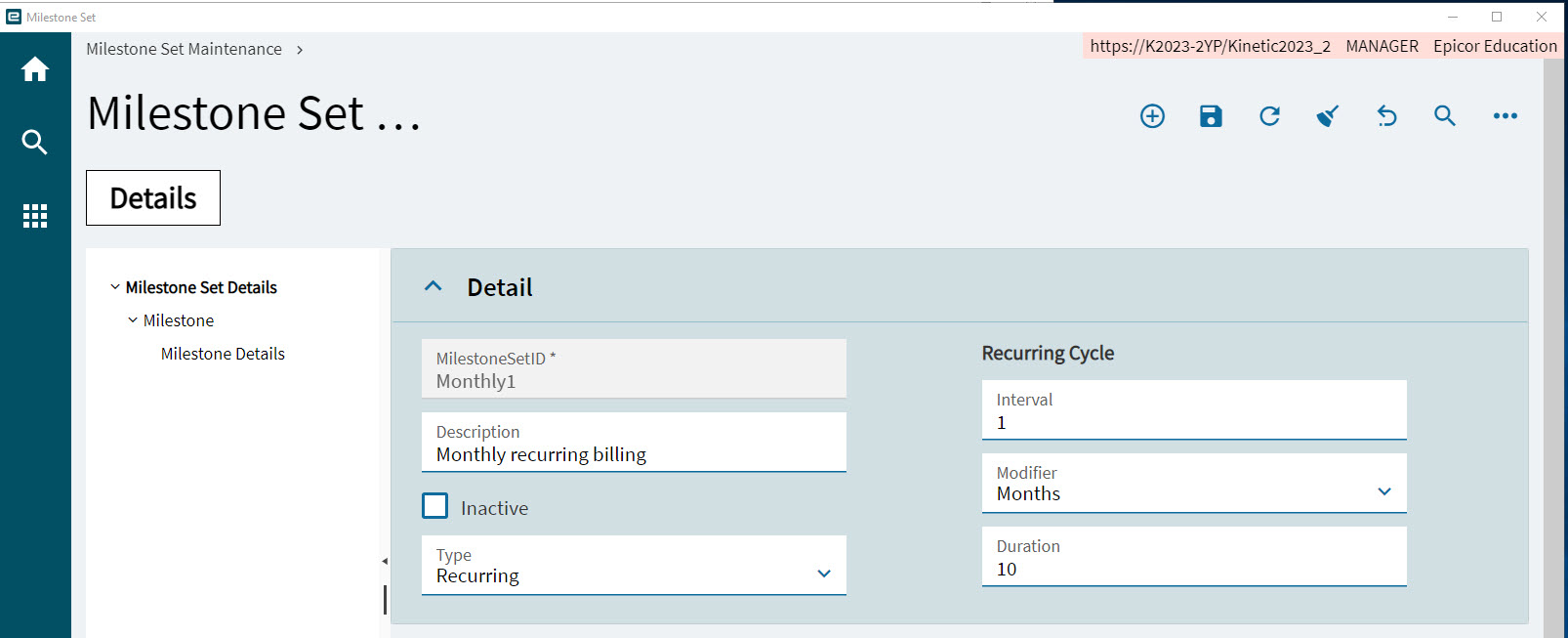
The new Milestone Set is saved.
-
-
Now add a single Milestone to the Milestone Set. See Adding Milestones to a Milestone Set.
Adding Milestones to a Milestone Set
For a Recurring Milestone Set, just add a single Milestone. For a Fixed Milestone Set, add one or more Milestones with Claim Percentages that add up to 100 in total.
-
Expand the Milestone card.
-
Select New
on the card menu bar. -
Type in a MilestoneID.
-
Type in a Description.
-
Type in a ClaimPercentage.
For a Fixed Milestone Set, the ClaimPercentage should be a portion of the total, which is 100 percent.
For a Recurring Milestone Set, the ClaimPercentage should be a factor of 100 percent (for example, 10 percent), calculated as described above. See Adding a Recurring Milestone Set.
-
Type in a Seq. (sequence number).
-
Select Save
on the Standard toolbar. -
For a Fixed Milestone Set, continue to add Milestones. The sum of the ClaimPercentage values from all Milestones within the Milestone Set should total 100.
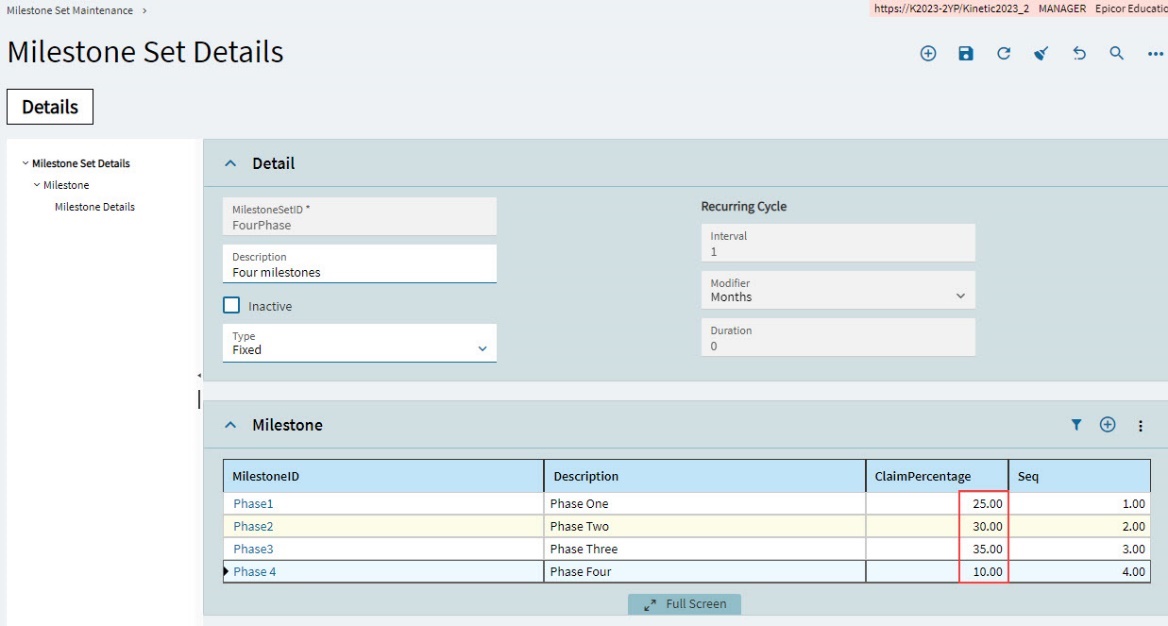
Example Milestone Sets
|
|
Example of a typical Fixed Milestone Set for a single customer |
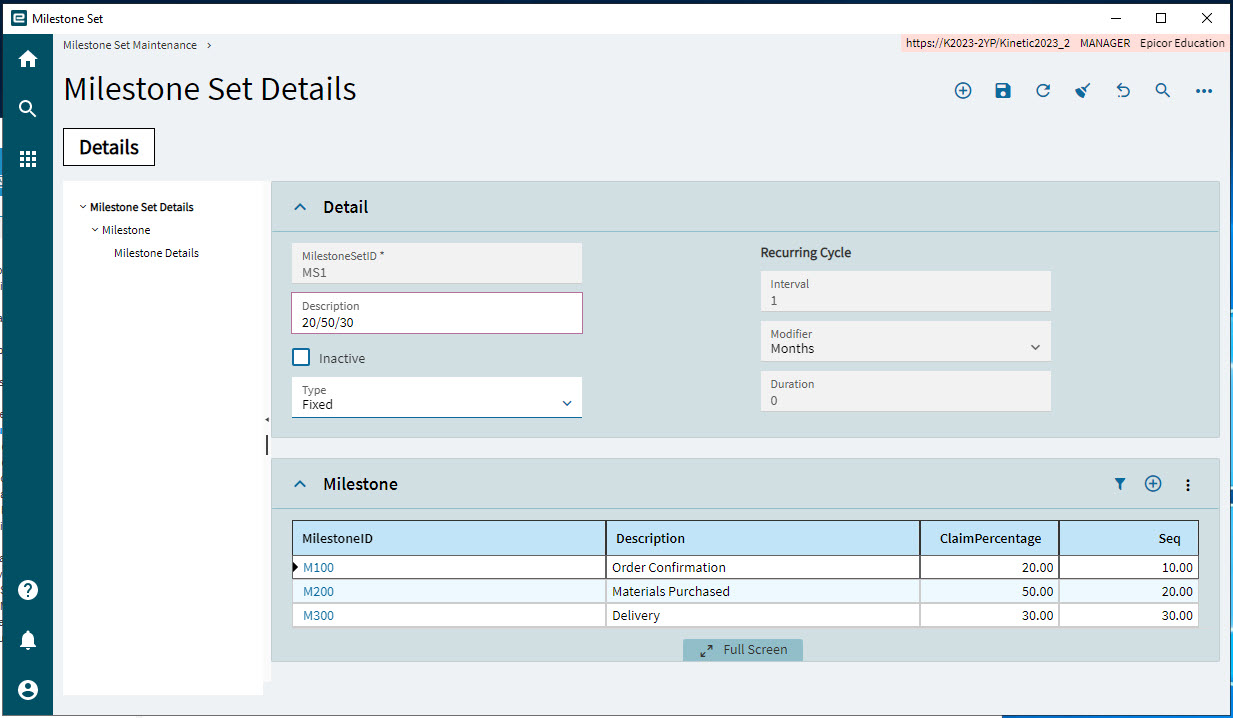
|
|
Example of a Fixed Milestone Set suitable for "On Award" or "Initial Progress" payments. |
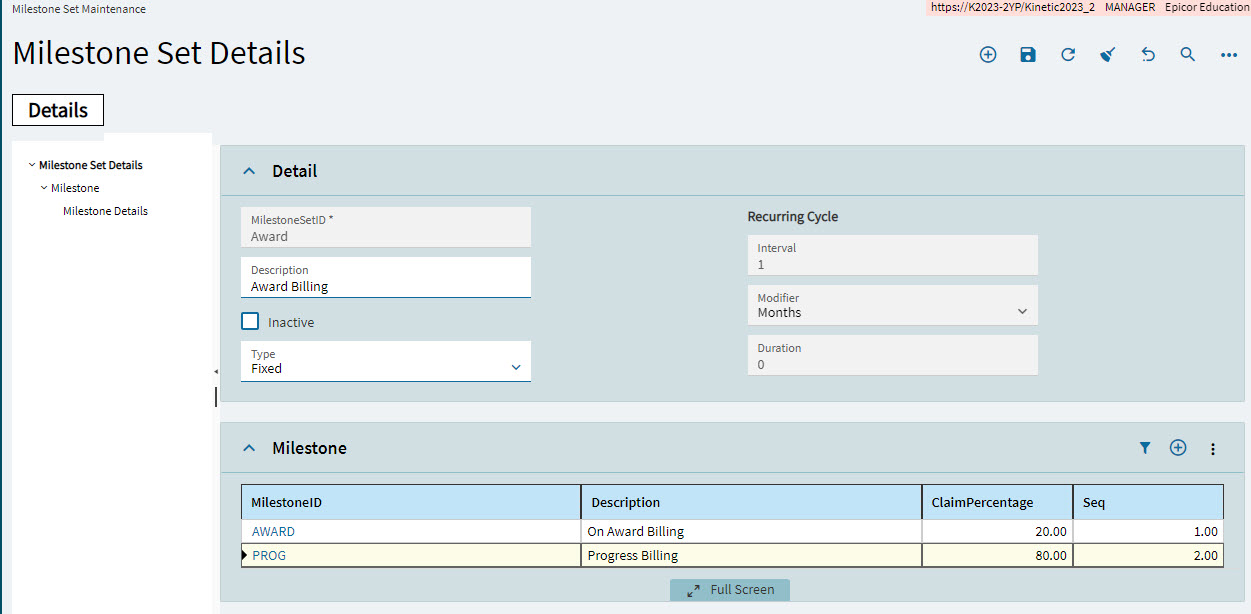
|
|
Example of a Recurring Milestone Set suitable for monthly payments. |
| All the Milestones created against a Fixed Milestone Set should have a combined total Claim Percent of 100. |